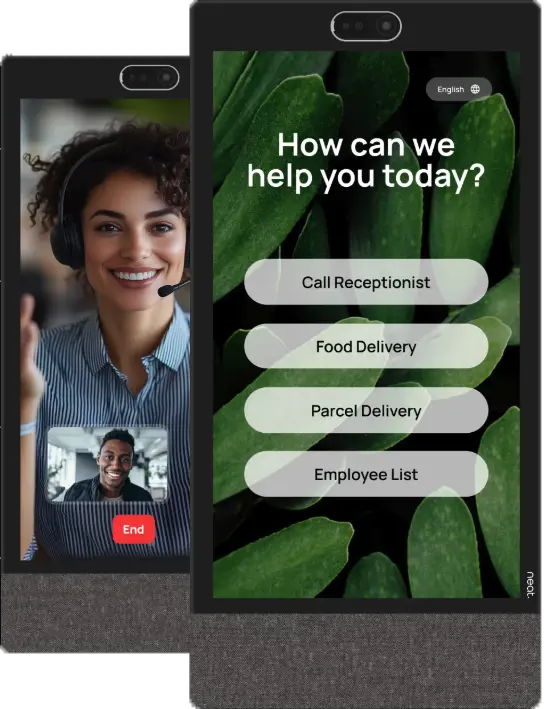
Each package includes essential visitor management functionalities, while also offering unique, specialized features. Whether you want a simple check-in process or a fully automated digital front desk, you will always benefit from a streamlined, professional and welcoming visitor experience.
Visitors can be pre-registered through the online portal or mobile app. Enter details such as name, email address and phone number, and they will automatically receive an email with a QR code for quick check-in upon arrival. The host receives an instant notification.
Unregistered visitors can easily sign in on-site via the kiosk. After accepting any safety instructions, they are checked in automatically.
Extra functionalities
Automatic email or text message notifications upon visitor arrival
Badge printing options
Customizable templates and emails in your own corporate style
Add directions, safety instructions or health checks
Overview & Security
Through the online portal, you can see in real time who is in the building. This is essential for emergency procedures, evacuations and visitor safety.
Integrations & customizations
You decide which information a visitor must enter. Everything is easy to set up in the online portal. Every element of the interface – buttons, layout, colors, logo, all can be personalized to match your corporate identity.
Visitors check in via the kiosk by following a few simple on-screen steps. They select the employee they are visiting, who receives an immediate notification. Notifications can be sent via email or established via a live connection.
Extra functionalities
Video calling directly from the kiosk for remote personal reception
Employees can share documents on-screen during the call
Documents can be signed digitally on the kiosk (e.g., NDAs or safety forms)
Overview & Security
DFD Smart provides real-time insight into who is present in the building, essential for safety and security procedures.
Integrations & customizations
DFD Smart integrates seamlessly with Microsoft Teams. Visitors starting a video call are automatically connected to your organization’s Teams environment. Settings are flexible and easy to manage. All buttons, colors and logos can be fully customized to your corporate identity through the online portal.
Invited visitors receive an email with a QR code or PIN code. Upon arrival, they scan the code to check in. The right employee receives an immediate notification via SMS, email or live connection. Walk-in visitors can also register manually at the kiosk.
Checking out works the same way: with QR code, PIN or manual name entry.
Extra functionalities
Invite: invite visitors in advance for a fast and smooth check-in
Wayfinding: visitors are guided to the right room via the screen
Automatic Wi-Fi: access for visitors without manual settings
Overview & Security
With a security code, you can check at any time who has checked in and who has not yet checked out. This gives you real-time insights into building occupancy.
Integrations & Customizations
DFD Plus can connect with various systems, such as Outlook, Paxton, Nedap ONS and more! Also, this software is fully customizable to your corporate identity. The layout of the interface can be flexibly set up according to your needs.